Here goes the links to download the versions. With this new GUI version, we can change /reset the iLO password, change the IP address, Subnet & Gateway configurations and many more - HP Lights-Out Online Configuration Utility for Windows 2003/2008 x64 Editions Click here to download x64 bit version Type: Software - Lights-Out Management Version: 3.1.1.0 (22 Nov 2010) Operating System(s): File name: cp013639.exe (1.0 MB) HP Lights-Out Online Configuration Utility for Windows Server 2003/2008 Click here to download x32 bit version (3.2.0.0) Type: Software - Lights-Out Management Version: 3.2.0.0 (18 Jul 2011) Operating System(s): Microsoft Windows Server 2003, Microsoft Windows Server 2008 W32 File name: cp015357.exe (950 KB) HP Lights-Out Online Configuration Utility for Windows Server 2003/2008 Click here to download x32 bit version (3.1.0.0) Type: Software - Lights-Out Management Version: ...
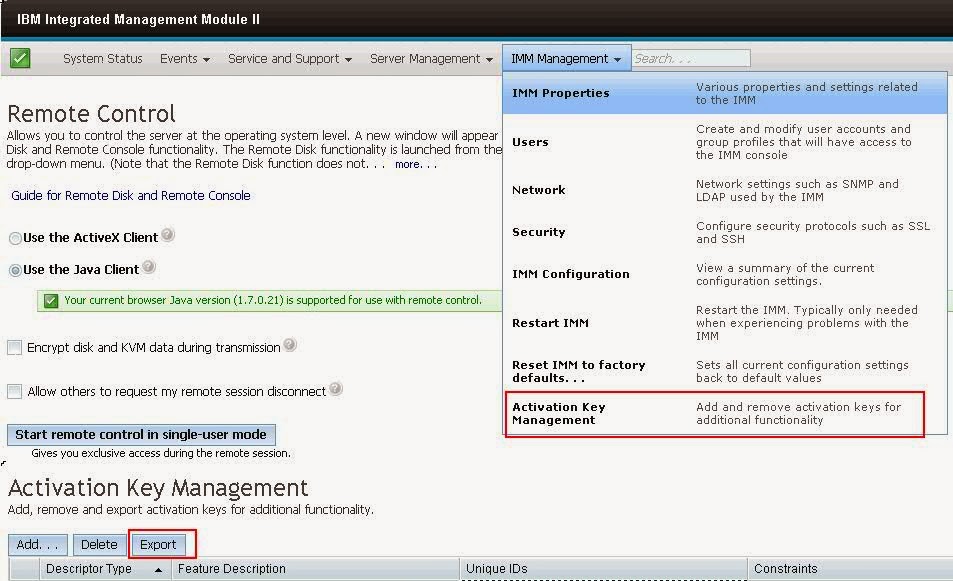
If you are planning to replace the system board (Mother Board) for M4 series of IBM xSeries 3650 model server, you should and must take the activation keys backup, otherwise you will miss the IMM key. IMM key something like iLO Activation key on HP servers. If that iLO key didn't acivated, then you won't get the 'Remote Access' option. In the same way, IBM series requires a key to be activated to access the IMM console. IMM Activation to be backuped and restore once the new board get replaced. Here is the screenshot there you see more options what we discussed so far -
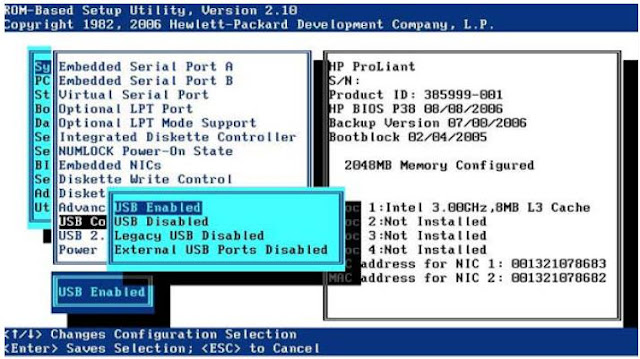
Do you guys have any requirement to boot the server using an internal USB Flashdisk or USB key. This option is mainly used for VMware. However, when an external USB key is connected the server tends to boot from the external USB key. HP Proliant Server has a solution for this. The USB boot option needs to be changed in RBSU. Boot the server to RBSU System Option >> USB options >> USB Control >> External USB ports Disabled The USB Control menu determines how USB ports and embedded devices operate at startup: • When USB Enabled is selected, all USB ports and embedded devices are enabled. • When USB Disabled is selected, all USB ports and embedded devices are disabled. • When Legacy USB Disabled is selected, all USB ports are enabled under a USB-aware OS, but USB is not supported during POST or RBSU. Legacy USB Disabled also disables iLO 2 virtual devices. • When External USB Port Disabled is selected, external USB ports are disabled. Under this option, em...
Comments