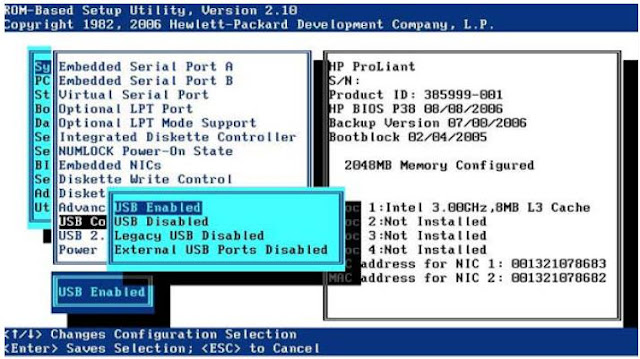
Do you guys have any requirement to boot the server using an internal USB Flashdisk or USB key. This option is mainly used for VMware. However, when an external USB key is connected the server tends to boot from the external USB key. HP Proliant Server has a solution for this. The USB boot option needs to be changed in RBSU. Boot the server to RBSU System Option >> USB options >> USB Control >> External USB ports Disabled The USB Control menu determines how USB ports and embedded devices operate at startup: • When USB Enabled is selected, all USB ports and embedded devices are enabled. • When USB Disabled is selected, all USB ports and embedded devices are disabled. • When Legacy USB Disabled is selected, all USB ports are enabled under a USB-aware OS, but USB is not supported during POST or RBSU. Legacy USB Disabled also disables iLO 2 virtual devices. • When External USB Port Disabled is selected, external USB ports are disabled. Under this option, em...
Comments