Posts

[Solved] Browsing datastores from VirtualCenter fails: Failed to log into NFC server

Why this error occurs and the symptoms: Downloading a file to local machine with the vCenter clients datastore browser fails with the error: Failed to log into NFC server Connecting vCenter client directly to ESX hosts works without error. ESX host /etc/ vmware /config files  contain the lines: authd.soapServer = "TRUE" prefvmx.consolidateDeleteNFSLocks = "TRUE"authd.proxy.vpxa-nfc = "vmware-vpxa:vpxa-nfc" authd.proxy.vpxa-nfcssl = "vmware-vpxa:vpxa-nfcssl" Solution for this issue or error: This issue occurs when a carriage return is missing from /etc/vmware/config. To resolve this issue, go to edit /etc/vmware/config: 1. Make a backup of this file from the path - /etc/vmware/config, by executing the below command: cp /etc/vmware/config /var/tmp/ 2. Edit /etc/vmware/config so that there is a carriage return after the line: prefvmx.consolidateDeleteNFSLocks = "TRUE" so that it reads the below: authd.soapServer = "TRUE"...

Time to learn Cloud Computing - 2014 Cloud Jobs

Image
Now a days every one and every where talks about Cloud Computing which the current technologies and big companies all looking at the Cloud solution. However, is it really required to leave the current jobs and move to cloud environment, how far this is correct? Cloud Computing is a concept or a layer based technology which works on the virtualization base. Now IBM acquired Soft Layer for the cloud also taken the Platinum Membership in OpenStack group. OpenStack is a open source which IBM team can directly make the changes to the source code and create a new platform for the Cloud. To make the changes to OpenStack, it is required learn Python programming language. As per the survey, there are about 14 million jobs will get created on Cloud Computing all over the world. However, in this 80% would be for the developers and the rest 20% for the Infrastructure Support jobs. Already different courses are available to learn Cloud in India. In India Benguluru, Hyderabad Chennai based loca...

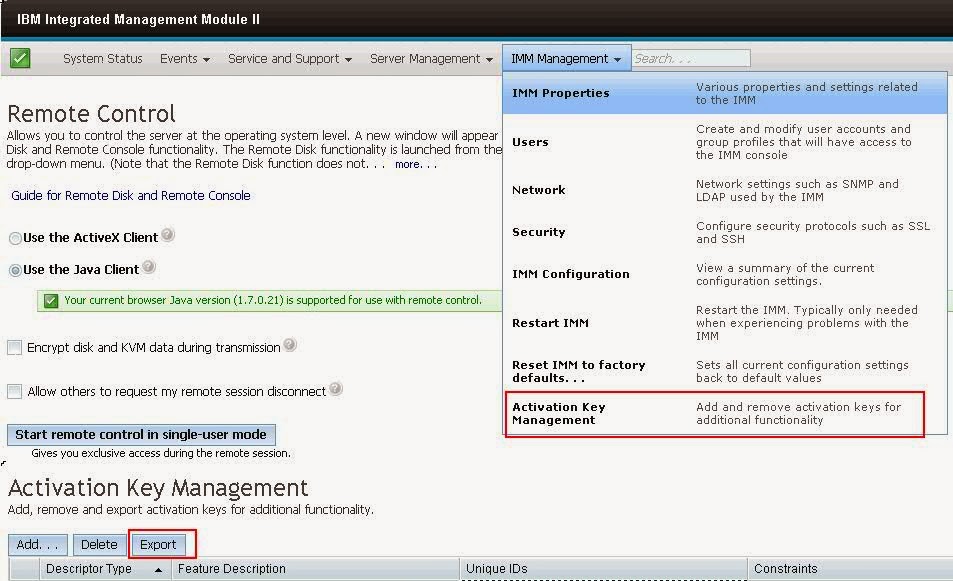
IBM x3650 M4 Series Server Model - Activation Keys Backup to be taken for IMM Moduel II, why?

Image
If you are planning to replace the system board (Mother Board) for M4 series of IBM xSeries 3650 model server, you should and must take the activation keys backup, otherwise you will miss the IMM key. IMM key something like iLO Activation key on HP servers. If that  iLO key didn't acivated, then you won't get the 'Remote Access' option. In the same way, IBM series requires a key to be activated to access the IMM console. IMM Activation to be backuped and restore once the new board get replaced. Here is the screenshot there you see more options what we discussed so far -

How to check 'Native MPIO' on Windows 2008 Server - Enable or Disable?

Image
This tip might help you guys to check the 'Native MPIO' setting on Windows 2008 Server from command line - To check the Native MPIO (Microsoft Multipath I/O) on Windows 2008 Server - If the Native MPIO is enabled, will show like below (DSM - Device Specific Model) If the Native MPIO is NOT enabled and installed some other vendor specific will show like below - (this server has Veritas Storage Foundation, hence showing like this)

'Remote Server Uptime' Check from Command Line

There are several ways to check the Microsoft Windows 'remote server' uptime information using 'SystemInfo' command line command. This is for the all the Windows versions like Windows 2000, Windows 2003, Windows 2008, Windows 2012 Server editions for both x86 and x64 bit versions. Here goes different ways to check the Remote Server Uptime from Command Line - Uptime.exe This can be downloaded from the Microsoft website. However this helps only to check your local server uptime. SystemInfo: Go to command prompt and run this command. If you are using 2008 Server, then right click on the Command Prompt Icon, 'Run as Administrator' systeminfo /s | find "System Up Time" PSEXEC: PSEXEC will be used to get the remote server uptime information in the batch files, VB scripts.

The system cannot find the specified path - EMC Grabs error

We are trying to run the EMCRPTS___.exe (x64 / x32 bit) version on one of the server, however it is throwing some error like 'The system cannot find the specified path' and come out without prodcuing a report. Then we tried investigating why it is not running and not creating the report in c:\windows\EMCReports folder. Found that issue with the existing EMCReports folder which is causing the issue. When we run the EMCRPTS__.exe file, it tries to create a folder called EMCReports in c:\windows path. Some times, this folder already exists and won't allow to overwrite information under this. Remove the EMCReports folder from the c:\windows directory and re-run the EMCRPTS.exe file.

iLO 3 vs iLO 4 Version Feature Differences & Comparison

Image
HP iLO 4 and iLO 3 Advanced HP iLO 2 Advanced HP iLO 4 and iLO 3 Advanced for BladeSystem HP iLO 2 Advanced for BladeSystem Here is the HP Link to check the iLO various version comparisons - http://h18004.www1.hp.com/products/servers/management/iloadvanced/comparison.html