Posts

hostd is running out of memory and crashing on Nutanix, any solution to fix the issue ?

The Nutanix software is using the createContainerView API to create recursive container views on the root object with a single type in the list of types to look out for - Virtual Distributed Switch.  However, once it is done using them, it neglects to call View.Destroy to free the ContainerView after it is done using the object. Typically the error seen within hostd.log is “--> Panic: Memory exceeds hard limit. Panic” AND the Nutanix VIBs are loaded and the software on is the hosts/VMs. This has been seen on 5.5 and 6.x hosts. If you suspect you have an issue where hostd has crashed due to out of memory, and you are running Nutanix / Nimsoft software and you still have the zdump file - so far no fix yet, could be only one thing you could do is, raise a case with the vendor to have a fix.

VMware PSOD Purple Screen of Death - Debugger waiting (world 2078) -- no port for remote debugger. "Escape" for local debugger

Image
How to deal with PSOD - VMware PSOD Purple Screen of Death - Debugger waiting (world 2078) -- no port for remote debugger. "Escape" for local debugger - Easy troubleshooting steps and how to identify or determine exact root cause of the PSOD issue Host is down with PSOD with the above said error. Verified BIOS settings, worked with on site engineer, contacted the IBM server support (since this is IBM server, have contacted IBM, if it is IBM or some other hardware, you may need to reach out the respective vendor) Sometimes it could be server hardware issue like DIMMs, CPU, Processor related or may be a chance of network related. Please have a through check on the above said and come to a conclusion what could the issue. Based on that, need to troubleshoot the issue.

VM Server going to hung state due to snapshot backup failed

Guest OS VM sessions going into hung state or unresponsive state while taking snapshot backups. The reason being, while taking snapshot backups, if any more activities planned like running some batch scripts that might cause CPU spike. This leads to more load on the VM session, the assigned resources are not available or in some cases, the data store got filled out fast. In this scenario, we will have stop the VM snapshot backup and reboot the server and check the logs what is the reason the server went into hung state. If the same issue getting repeated, VMware admins can do is, when you found the VM session in unresponsive state, move the VM into suspend mode and download the logs. Later can do the investigation if needed.

Site Recovery Mgr (SRM) Service Name, where to find?

Image
VMware System Admins must know this information where the VMware Site Recovery Manager service name will be available in case, if admin unable to connect to SRM configuration server via vCenters. Usually SRM server will be different than the vCenter server. What is the VMware Site Recovery Manager (SRM) service and where we can find this? This can be found in Services Login to SRM server and go to Services and search for VMware VMware vCenter Site Recovery Manager Server

Win 9 beta preview expectations & release date

Image
'Windows 9 Threshold' operating system to be release soon with lot of expectations. Microsoft yet to confirm the release date of this newer OS version. However, 30th September 2014 can expect some news about this Windows 9 series. 30th Sept 2014 - A Big Day for Microsoft on Windows 9 Preview There is a expectation that, Microsoft would reveal some news about its new operating system Windows 9 features and first look. Few screen shots expected how the it looks like etc. Any Win9 vs Win8 previous versions OS Architecture differences? Yes could be a chance and as per the news that, security wise kernel will be robust as like the Unix operating systems and few more features to be added. Windows9 Beta and Preview release dates if any? (download links) Expectation is 30th Sept'14 would see some news about these releases.

Windows 8.1 'August Update' 2 - What major new features to be included?

Image
As expected Windows 8.1 Update been released as 'August Update' and however as per the reviews says it doesn't include much of its new features in it. The following some of them could be the improvements in this new update Windows 8.1 : Precision touchpad improvements and 3 new end-user settings been added like  Leave touch pad on when a mouse is connected, allow right-clicks on the touchpad, double-tap and drag are the new. Miracast Receive – exposes a set of Wi-Fi direct APIs for Independent Hardware Vendor (IHV) drivers or OEM drivers to develop Windows 32-bit applications that run on all supported x86-based or x64-based versions of Windows 8.1, enabling the computer as a Miracast receiver. Minimizing login prompts for SharePoint Online – reduces the number of prompts with federated use in accessing SharePoint Online sites. If you select the “Keep me signed in” check box when you log on for the first time, you will not see prompts for successive access to t...

How to Upgrade or Uninstall DoubleTake Version 5.2 or later without being prompted for a Reboot?

Customer needs to perform upgrade or uninstall of Doubletake Availability, Move, or RecoverNow version 5.2 or later without being prompted for a reboot. **Solution** Version 5.2 or later of Doubletake uses mini-filter drivers and so does not require a reboot when upgrading or uninstalling.  In order to ensure that a reboot is not prompted during the upgrade or uninstall process, however, you must stop all Doubletake services and kill any Doubletake processes running under any user on the server. If any consoles are open or if the Doubletake.exe process is still running, a reboot may be required or a false positive message stating a reboot is required may appear.  Once all Doubletake services and executables are stopped, there will be no reboot required for Doubletake. Note: Doubletake does require certain C++ components and .NET 3.5.1 components for version 5.2 and later.  If these are not present then an upgrade my require them to be installed and those...

[Solved] Browsing datastores from VirtualCenter fails: Failed to log into NFC server

Why this error occurs and the symptoms: Downloading a file to local machine with the vCenter clients datastore browser fails with the error: Failed to log into NFC server Connecting vCenter client directly to ESX hosts works without error. ESX host /etc/ vmware /config files  contain the lines: authd.soapServer = "TRUE" prefvmx.consolidateDeleteNFSLocks = "TRUE"authd.proxy.vpxa-nfc = "vmware-vpxa:vpxa-nfc" authd.proxy.vpxa-nfcssl = "vmware-vpxa:vpxa-nfcssl" Solution for this issue or error: This issue occurs when a carriage return is missing from /etc/vmware/config. To resolve this issue, go to edit /etc/vmware/config: 1. Make a backup of this file from the path - /etc/vmware/config, by executing the below command: cp /etc/vmware/config /var/tmp/ 2. Edit /etc/vmware/config so that there is a carriage return after the line: prefvmx.consolidateDeleteNFSLocks = "TRUE" so that it reads the below: authd.soapServer = "TRUE"...

Time to learn Cloud Computing - 2014 Cloud Jobs

Image
Now a days every one and every where talks about Cloud Computing which the current technologies and big companies all looking at the Cloud solution. However, is it really required to leave the current jobs and move to cloud environment, how far this is correct? Cloud Computing is a concept or a layer based technology which works on the virtualization base. Now IBM acquired Soft Layer for the cloud also taken the Platinum Membership in OpenStack group. OpenStack is a open source which IBM team can directly make the changes to the source code and create a new platform for the Cloud. To make the changes to OpenStack, it is required learn Python programming language. As per the survey, there are about 14 million jobs will get created on Cloud Computing all over the world. However, in this 80% would be for the developers and the rest 20% for the Infrastructure Support jobs. Already different courses are available to learn Cloud in India. In India Benguluru, Hyderabad Chennai based loca...

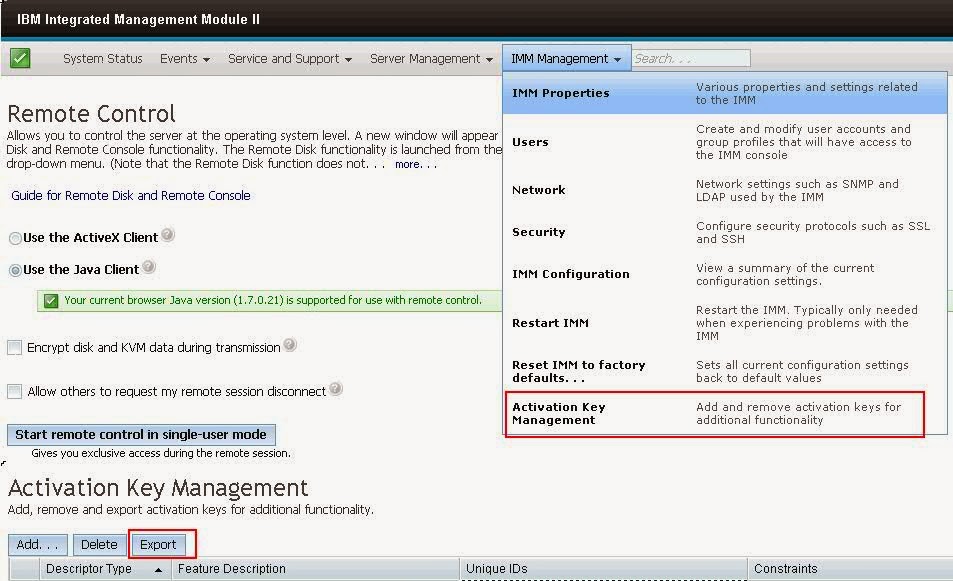
IBM x3650 M4 Series Server Model - Activation Keys Backup to be taken for IMM Moduel II, why?

Image
If you are planning to replace the system board (Mother Board) for M4 series of IBM xSeries 3650 model server, you should and must take the activation keys backup, otherwise you will miss the IMM key. IMM key something like iLO Activation key on HP servers. If that  iLO key didn't acivated, then you won't get the 'Remote Access' option. In the same way, IBM series requires a key to be activated to access the IMM console. IMM Activation to be backuped and restore once the new board get replaced. Here is the screenshot there you see more options what we discussed so far -

How to check 'Native MPIO' on Windows 2008 Server - Enable or Disable?

Image
This tip might help you guys to check the 'Native MPIO' setting on Windows 2008 Server from command line - To check the Native MPIO (Microsoft Multipath I/O) on Windows 2008 Server - If the Native MPIO is enabled, will show like below (DSM - Device Specific Model) If the Native MPIO is NOT enabled and installed some other vendor specific will show like below - (this server has Veritas Storage Foundation, hence showing like this)

'Remote Server Uptime' Check from Command Line

There are several ways to check the Microsoft Windows 'remote server' uptime information using 'SystemInfo' command line command. This is for the all the Windows versions like Windows 2000, Windows 2003, Windows 2008, Windows 2012 Server editions for both x86 and x64 bit versions. Here goes different ways to check the Remote Server Uptime from Command Line - Uptime.exe This can be downloaded from the Microsoft website. However this helps only to check your local server uptime. SystemInfo: Go to command prompt and run this command. If you are using 2008 Server, then right click on the Command Prompt Icon, 'Run as Administrator' systeminfo /s | find "System Up Time" PSEXEC: PSEXEC will be used to get the remote server uptime information in the batch files, VB scripts.

The system cannot find the specified path - EMC Grabs error

We are trying to run the EMCRPTS___.exe (x64 / x32 bit) version on one of the server, however it is throwing some error like 'The system cannot find the specified path' and come out without prodcuing a report. Then we tried investigating why it is not running and not creating the report in c:\windows\EMCReports folder. Found that issue with the existing EMCReports folder which is causing the issue. When we run the EMCRPTS__.exe file, it tries to create a folder called EMCReports in c:\windows path. Some times, this folder already exists and won't allow to overwrite information under this. Remove the EMCReports folder from the c:\windows directory and re-run the EMCRPTS.exe file.

iLO 3 vs iLO 4 Version Feature Differences & Comparison

Image
HP iLO 4 and iLO 3 Advanced HP iLO 2 Advanced HP iLO 4 and iLO 3 Advanced for BladeSystem HP iLO 2 Advanced for BladeSystem Here is the HP Link to check the iLO various version comparisons - http://h18004.www1.hp.com/products/servers/management/iloadvanced/comparison.html

Latest PSP Version 9.10 Direct Download for Windows 2008 R2 on HP ProLiant Servers, 'PSP renamed as SPP'

HP ProLiant Servers latest Service Pack released recenlty is 9.10. This could be the last service pack version which HP released recenlty. The HP Service Pack for ProLiant (SPP) replaces Windows and Linux ProLiant Support Pack (PSPs). The final version of PSPs will be Version 9.10. During this extended transition period, both products are released concurrently with the SPP which will contain the same content and functionality. Here goes the direct link to download the HP ProLiant Support Pack - Type: Software - Support Pack Version: 9.10 (4 Jun 2012) Operating System(s): Microsoft Windows MultiPoint Server 2011, Microsoft Windows Server 2008 R2, Microsoft Windows Small Business Server 2011 Standard and Essentials (multi-part download) File name: bp001183.xml (177 KB) File name: psp-9.10.w2k8R2.x64.exe (209 MB) File name: psp-9.10.w2k8R2.x64.exe.md5sum (59 Bytes) For Windows 2008 R2

Can IIS 6 upgraded to IIS 7 Version on Windows 2003?

If you want try upgrading the existing IIS 6 version to IIS 7 on Windows 2003 Server with SP1 / SP2 / SP3, however this won't possible as long as you have Windows 2008 Server installed. This is been suggested by the Microsoft and not possible to upgrade the version from IIS6 to IIS7. Here goes few more reviews on the same in different websites -   http://forums.esds.co.in/f4/ugrade-iis6-iis7-4118/     http://stackoverflow.com/questions/1542831/how-to-upgrade-from-iis-6-0-to-iis-7-0-in-windows-2003  

WAAS - Wide Area Application Services by CISCO | WAAS At a Glance, Why WAAS

Cisco WAAS Benefits: Cisco's new WAN Optimization platforms dramatically scale the delivery of an optimal user experience to more users, applications, and devices across the entire organization. Cisco WAAS accelerates applications, optimizes bandwidth, provides local hosting of branch IT services, and enables a smooth evolution to cloud-based services. The new Cisco WAVE Appliances: 294, 594, 694, 7541, 7571, and 8541 are 2nd generation WAN optimization solutions, delivering both a dramatic increase in performance, with the following: Five times the performance with up to 2Gbps optimized WAN throughput Four times the virtual services density with support for up to 6 virtual blades Three times the scale with 150,000 TCP Connections Substantially reduced solution footprint - third of previous footprint For more information about WAAS can visit the below links - http://www.cisco.com/en/US/products/ps6870/product_at_a_glance_list.html PDFs Download Links : Cisco WAAS O...

Windows Server 2008 Step-by-Step Guides- Free PDF Downloads from Microsoft

Here goes the link to download the below listed PDF documents which are related to Windows 2008 Server - http://www.microsoft.com/download/en/details.aspx?id=17157 or  click the below links to download Creating_and_Deploying_Active_Directory_Rights_Management_Services_Templates_Step-by-Step_Guide.doc Deploying Active Directory Rights Management Services in a Multiple Forest Environment Step-by-Step Guide.doc Deploying Active Directory Rights Management Services in an Extranet Step-by-Step Guide.doc Deploying Active Directory Rights Management Services with Microsoft Office SharePoint Server 2007 Step-By-Step Guide.doc Deploying an Active Directory Rights Management Services Licensing-only Cluster Step-by-Step Guide.doc Deploying SSTP Remote Access Step by Step Guide.doc Removing Active Directory Rights Management Services Step-by-Step Guide.doc Server Manager Scenarios Step-by-Step Guide.doc Server_Core_Installation_Option_of_Windows_Server_2008_Step-By-Step...

New and Major Changes in NTFS of Windows 2008 R2 & Windows 7 Versions

What are the major changes? Several enhancements to improve performance have been made to the NTFS file system. The following changes are available in Windows® 7 and Windows Server® 2008 R2: Delete notification for solid state devices (SSDs) that support T10 Trim New opportunistic locks (oplocks) semantics and introduction of oplock keys Support for file system metadata defragmenting Improvements in Volume Shrink Ability to disable short names on a per-volume basis Improved concurrency of read requests while flushing Native VHD support Chkdsk performance improvements Robocopy performance enhancement Local file copy improvements For more info, refer this link

What's New in Microsoft iSCSI Initiator - 2008 Server R1 & R2 versions

Microsoft iSCSI Software Initiator enables you to connect a Windows® host computer to an external iSCSI-based storage array via an Ethernet network adapter. You can use Microsoft iSCSI Initiator in your existing network infrastructure to enable block-based Storage Area Networks (SANs), which provide iSCSI target functionality without having to invest in additional hardware, as well as to enable the use of iSCSI storage devices in the home and small office. What are the major changes?   The following changes are available in Windows Server® 2008 R2: User interface enhancement and redesign The iSCSI Initiator user interface has been redesigned to allow easier access to the most commonly used settings. Additionally, the iSCSI control panel is included in Server Core installations of Windows Server 2008 R2, which enables administrators to configure iSCSI connections through the more familiar user interface in addition to the command-line interface. Ne...